Any-Pack Pricing: The $0.82 to $949.99 Ladder
KeyGold lists Whiteout Survival pack orders as a flat ladder, one row for each in-game price tier: the $0.99 tier is published at $0.82 and the $999.99 tier at $949.99. Every row names the tier rather than a specific item, which is what makes the list easy to read and easy to misunderstand.

Key takeaways
- Eleven ANY-pack rows are published, from the $0.99 tier at $0.82 to the $999.99 tier at $949.99.
- The row names the in-game price tier, so the pack you actually receive depends on what you choose at that price inside the game.
- Whiteout Survival delivery is published as usually 10 to 30 minutes once the details are in, and the order is a login top-up.
- The page states that KeyGold buys the pack itself and does not sell Frost Star top-ups, and that Frost Stars convert at face value.
Reading the ladder row by row
The listing is arranged by in-game price, and each row carries a sale price and a list price beside it. The bottom of the ladder is the $0.99 tier at $0.82, and from there the steps climb through $1.99 at $1.63, $2.99 at $2.45, $3.99 at $3.26 and $4.99 at $4.08. The middle of the ladder is where most small purchases sit: $9.99 at $8.15, $19.99 at $16.31, $49.99 at $40.79 and $99.99 at $85.99.
At the top, two rows are built for players who buy in volume rather than by the pack: $499.99 at $469.99 and $999.99 at $949.99. The home page also prints an 18% discount row for Whiteout Survival, which lines up with the middle of this ladder, where the gaps between the two printed prices are consistently somewhere near a fifth of the list figure.
What an ANY tier actually means
The word ANY is doing real work in those row labels. The listing is not a fixed catalogue of items; it names a price tier inside the game's own shop, and the buyer chooses which pack at that tier they want. That is why the row is described by the in-game price instead of by an item name: the same $4.99 could be several different packs depending on what the game is offering that week.
Because the order is a login top-up, the store signs in to the account and buys the pack inside the shop, which is what gives it access to the exact item you asked for. The published note adds an important limit: limited-time gift packs, Monthly Cards and personalised offers are all reachable this way, while a UID top-up would not be able to touch them.
| In-game tier | KeyGold price | List price |
|---|---|---|
| ANY 0.99 pack | $0.82 | $0.99 |
| ANY 4.99 pack | $4.08 | $4.99 |
| ANY 19.99 pack | $16.31 | $19.99 |
| ANY 99.99 pack | $85.99 | $99.99 |
| ANY 499.99 pack | $469.99 | $499.99 |
| ANY 999.99 pack | $949.99 | $999.99 |
Worked example: how the tiers compare with each other
This is my own arithmetic on the published figures, not a statement about future prices. Take four rows at different heights on the ladder and work out the gap between the two printed numbers as a share of the list price.
The $0.99 row: $0.99 minus $0.82 = $0.17, and $0.17 / $0.99 = 17.2%. The $4.99 row: $4.99 minus $4.08 = $0.91, and $0.91 / $4.99 = 18.2%. The $19.99 row: $19.99 minus $16.31 = $3.68, and $3.68 / $19.99 = 18.4%. The $999.99 row: $999.99 minus $949.99 = $50.00, and $50.00 / $999.99 = 5.0%. So the relative gap is largest in the middle of the ladder and smallest at the very top, where a single large purchase is already priced tightly. Your own numbers will move with the tier you choose and with the pack that sits behind it.
Frost Stars are a payment rail, not a discount
Whiteout Survival runs on Frost Stars, and the store's own page is explicit about how they behave: they convert at face value, a dollar in and a dollar of pack out. The published example is a $9.99 pack that costs 999 Frost Stars, so buying tokens first and spending them afterwards changes nothing at all.
That is the reason the page states it does not sell Frost Star top-ups and buys the pack itself instead. The saving comes from the discount on the pack, not from the token. Anyone who has been told otherwise by a second-hand source has been given the wrong explanation of how the shop works.
Where the ladder fits a spending plan
Two published programmes can change what you actually pay, and both are worth checking before you pick a row. The first is the new-user coupon: registering brings one coupon with no threshold, valid for 30 days, and the home page notes that 9.3K people have claimed it. If you have never ordered, that is the moment to use it. The second is the loyalty programme, described on the home page as using points like cash, with more top-ups meaning more saved and rewards redeemable as they accumulate.
Neither of those changes the printed tiers, and neither is a substitute for reading the row you are buying. They simply sit on top of an order that is already priced against a list figure. If you buy once a month, the middle rows are where the relative gap is widest; if you buy once a season, the top two rows keep the order count low at a smaller relative gap. Both choices are defensible, and the page prints every number you need for either one.
What happens after you pay
The order becomes visible in your Order Record straight away, so the status can be checked at any time rather than guessed at, and a confirmation email follows once the purchase completes. Support is a live chat staffed by a person 24/7, before and after the order, which matters when the pack you want is a limited-time offer that may not be on the shelf tomorrow.
If the order cannot be delivered, the published Full Refund Guarantee applies: if an order is not delivered or cannot be used, you receive a full refund. That is the wording as it stands on the page, and it is a good reason to fill in the login details carefully the first time rather than experimenting.
Delivery, and what to have ready
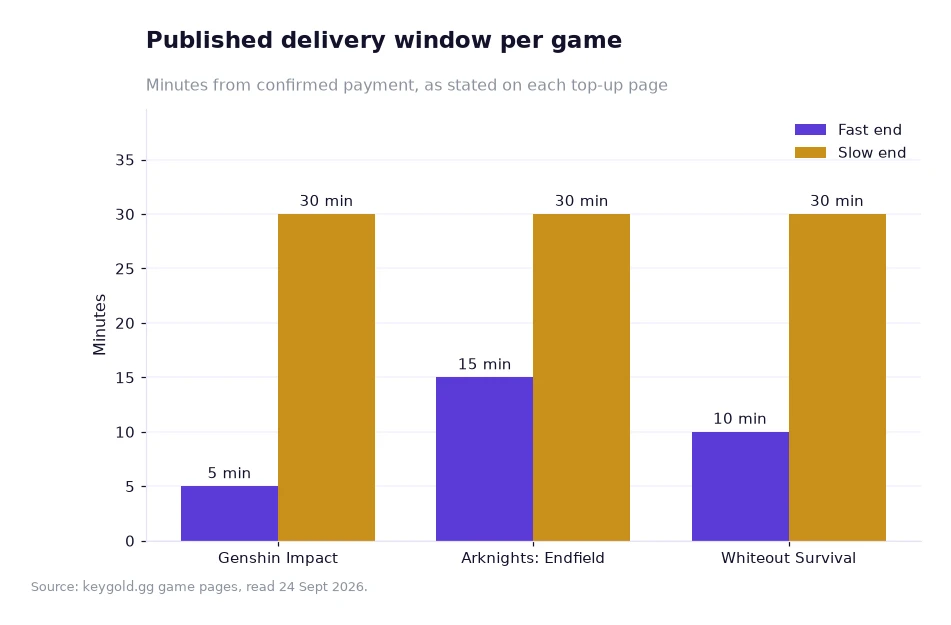
The chart sets Whiteout Survival's window beside two others in the same store. Whiteout orders are usually delivered in 10 to 30 minutes once the details are in, which sits in the same band as the other login top-ups rather than standing out. The order needs the login method you actually use for the game, whether that is Facebook or Google, plus the account and the password, and the delivery happens with the pack bought inside your own shop.
Frequently asked questions
Does KeyGold sell Frost Star top-ups?
No. The Whiteout Survival page states that KeyGold buys the pack itself rather than selling Frost Star top-ups, and that Frost Stars convert at face value: a dollar in, a dollar of pack out.
How long does a Whiteout Survival order take?
Usually 10 to 30 minutes once the details are in, with the order handled as a login top-up in your own account and live chat staffed 24/7.
Choosing a tier without overthinking it
Decide what you want to buy inside the game first, then find the row that matches its price and compare the two numbers printed beside it. If the pack you want is a limited-time offer or a Monthly Card, the whiteout survival frost star buy listing is the route that can reach it, since a UID-based purchase cannot. The top-up catalogue shows the same ladder structure across the other games, and the about page explains how the order and refund process is meant to work.
Every price, window and discount in this article is taken from KeyGold's own home page and game pages, read 24 Sept 2026, and is quoted in USD just as the site publishes it.[1]